
Facebook CAPI Main features, the difference from FB Pixel
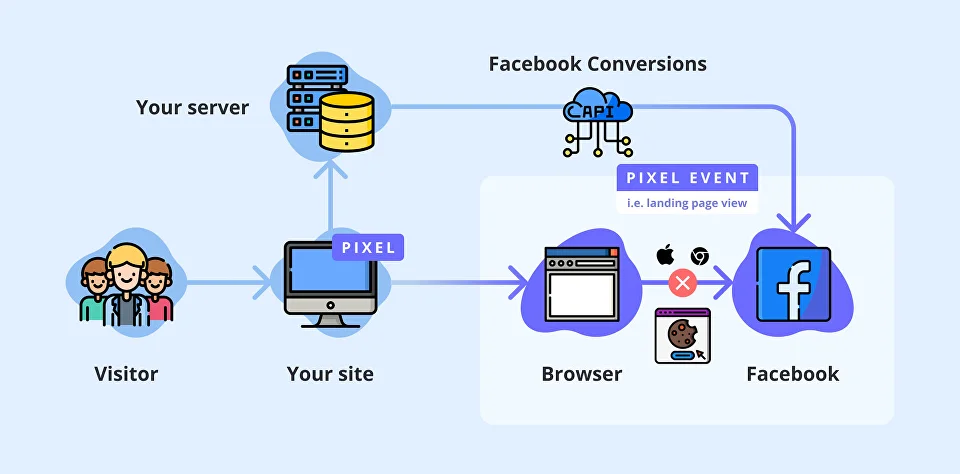
What is Facebook Pixel? Facebook Pixel is a code embedded into a website that tracks the actions of its visitors. This data serves to: measure Facebook ads performance; define custom audiences for targeting and setting up campaigns with dynamic ads; analyze the effectiveness of your site’s conversion funnels. How Facebook Pixel works A user visits your website performing some actions such as searching for products, adding them to cart, completing checkout, etc. The Facebook Pixel tracks these events and syncs with Facebook cookies in the user’s web browser. After the sync process, the user is being tagged as a part of certain target groups. When the user opens Facebook, the platform already knows which ads to show. Is there anything wrong with it? These days people are becoming more and more cautious about their data being shared over the internet. With the rise of concerns, new privacy regulations such as General Data Protection Regulation (GDPR), California Consumer Privacy Act (CCPA), and others came into effect. Moreover, web browsers implement changes to their latest versions towards privacy protection that affects third-party cookie sharing. As all the Facebook Pixel data is stored in cookie files locally on the user’s device — it’s becoming hard to track all the clients’ actions. Is there a workaround? If it’s challenging to work with cross-website cookies, can’t we perform the same data transfer actions without using those? Yes, we can — with the help of Facebook Conversions API, which tracks the events needed and store them on the server-side. How Facebook Conversions API works A user visits your website with a Facebook Pixel installed. The pixel stores the information about the user in a first-party cookie file (this cookie file operates with your website only). Your server saves this data that also includes information on how to distinguish this particular user from others. When the user triggers an event, the server sends a request with the information about the event and the user to the Facebook server. How to implement Facebook Conversions API To implement Facebook Conversions API you will need a Facebook App, Facebook Business Manager, and Facebook Pixel installed on your website that is associated with your Business Manager. Step by step, here we go: Open your Business Manager, navigate to Events Manager, click on Add New Data Source, and hit FB Conversions API. Open Settings, choose your Pixel and click on Next. Choose the existing App to work with API. If you don’t have one — click on Create New App and fill out the forms. Create a new system user and click on Create. Click on Generate Access Token, copy it, and save it locally on your computer. Hit Next. Use the saved token to implement the API calls by yourself with the help of documentation, or hit the Send instructions button to send them to your developer. Once it’s done, you can start sending data to the Facebook server. Takeaway The era of cookie-based advertisements is coming to its end. Companies are searching for alternative ways to operate with the data gathered from their customers. One of these methods is Facebook Conversions API. It might be more complicated to implement as it’s not just a few raws of code to copy and paste, but it allows you to bypass the new limitations and gives you better control over the data you share with the ad publishers.
10 tips how to optimize Facebook Ads for better performance in 2025

Facebook advertising remains one of the most effective tools for reaching your target audience. However, with constant algorithm changes and growing competition, it’s crucial to know how to optimize your advertising campaigns for maximum results. This article looks at key Facebook ad performance metrics, optimization frequency, ways to improve ROI, and 10 actionable tips for boosting ad performance in 2025, including a brief overview of the 10 tips. What are the Main Facebook Ads Performance Metrics? Reach shows the number of unique users who have seen your ad at least once. This metric helps you assess the scale of your campaign’s impact and its ability to reach new audiences. Impressions show the total number of times your ad has been shown on user screens, including repeat views. A high number of shows with low coverage may indicate an excessive frequency of showing to the same audience. Click-through Rate (CTR) is the percentage of users who click on an ad after viewing it. High CTR means advertising attracts attention and meets the target audience’s interests. Cost per click (CPC) shows the average amount you pay for each click on your ad. Managing ad spend effectively can help lower PCP by optimizing your budget allocation and selecting appropriate bidding strategies. Conversions reflect the number of actions users have taken since interacting with the ad (such as buying, subscribing, or filling out a form). The high number of conversions indicates the effectiveness of advertising content and a properly configured sales funnel. Cost Per Acquisition (CPA) is the average cost you pay for each conversion. A high CPA may indicate ineffective advertising or an incorrectly configured audience. How often should I optimize my Facebook Ads? Optimizing Facebook advertising campaigns is an integral part of digital marketing strategy and takes time to achieve maximum effect. Once a campaign is launched, Facebook’s algorithms need data collection and training to understand the audience targeted by the ad properly. This is called the learning phase, which usually lasts 3 to 7 days. During this phase, the system determines the best methods to attract users who will interact with your ads and adjusts the strategy based on initial feedback. Different configurations within an ad set can significantly affect the learning phase and overall campaign performance. To improve Facebook ad performance, it’s important to give the algorithm enough time to fine-tune its approach before making any drastic changes. After completing the training phase, conducting a detailed analysis of the campaign results is important. This will provide an opportunity to assess how effectively advertising works and decide whether to change the campaign settings. However, excessive parameter changes early on can prevent algorithms from adequately learning and optimizing the campaign. Therefore, changes should only be made after sufficient time for data collection, and adjustments should be made based on real results such as CTR, conversions, or cost per click. Such changes should be justified and based on a detailed analysis of the resulting metrics. So, the optimal frequency of advertising optimization on Facebook is every 7-14 days, depending on the performance indicators. At the same time, it is important to avoid frequent changes to not bring down the learning phase. How to increase ROI on Facebook ads? Identify key conversions for tracking. The first step is to determine which user actions have the greatest business value. This can be a purchase, registration on the site, filling out a contact form, etc. It is important to focus only on those conversions that directly affect the achievement of your goals, so as not to waste resources on tracking less important actions. Set up correct conversion tracking. Once you have identified the key conversions, you must set up the appropriate tags and integrations for accurate data collection. This includes correctly installing and checking all the necessary elements to track conversions correctly on the site or app. Optimize tracking settings. Use dynamic tracking and automatic rules to adjust rates and budgets based on your campaign results. This will allow you to automatically adapt campaigns to changing conditions and get the best results without any extra effort. Check tracking data regularly. Update and check your tracking settings for errors or inaccuracies. It is important that the collected data is correct, since the effectiveness of campaigns and the correctness of decisions made regarding the further budget or rates depend on it. For monitoring your server container, the GTM container Stape can offer a Monitoring feature that allows you to set up notifications according to your needs. Analyze campaign results. Regularly analyze the effectiveness of your campaigns to understand which creatives, placements, and audiences work best. This analysis will allow you to understand what brings the best results, and direct efforts to further optimize them. Adjust campaigns based on analysis results. Based on the collected campaign performance data, make adjustments to your ads, bids, and targeting. Raise the stakes for channels that produce good results and adjust those that fall short of expectations. Testing new strategies. Regularly conduct A/B testing for new ads, targeting, and strategies to determine which are most effective. This will allow you to get the best results without stopping the process of optimization and adaptation. Continuous improvement of campaigns. Constantly improve advertising campaigns, focusing on new strategies and changes in business. Consider seasonal fluctuations or changes in business objectives to maintain high campaign performance at all times. 10 Tips to Improve Facebook Ads Performance in 2025 Use server-side tracking. Switching to a server-side method of tracking data allows you to bypass the restrictions of browsers and ad blockers, providing more accurate data on user interaction with your advertising. This contributes to more effective targeting and increased ROI. Create high-quality and relevant content. Use attractive images and videos that match the interests of your target audience. Optimize mobile ad versions. Most users browse Facebook from mobile devices, so it’s important that your ads are tailored to mobile screens. Use retargeting. Set up campaigns to re-engage users who have already interacted with your site or previous ads. Retargeting is a powerful tool to engage users who have already interacted with your
Conversion Rate Optimization for Facebook Ads Landing Pages in 2025
Facebook Ads can drive massive traffic to your website, but traffic without conversions is just wasted budget. If you’re running ads for a Direct-to-Consumer (D2C) or e-commerce brand and struggling to turn clicks into sales, the problem likely isn’t your ads. It’s your landing page. In this guide, you’ll learn how to optimize your landing pages for higher conversion rates from Facebook Ads, using proven strategies, psychological principles, and data-backed best practices that work in 2025. Why Landing Page CRO is Crucial for Facebook Ads Success Meta’s algorithm (especially with Advantage+ Shopping Campaigns) is designed to maximize conversions, not just clicks. But if your landing page fails to convert, Meta’s AI will learn that your page doesn’t perform. That leads to higher CPMs, lower ROAS, and poor delivery. A well-optimized landing page: Increases conversion rates without increasing ad spend Sends positive signals to Meta’s algorithm Builds trust and reduces bounce rate Makes scaling easier and more profitable SEO Keywords: Facebook Ads landing page optimization, conversion rate optimization, CRO for D2C, improve Facebook Ads performance, landing page tips for 2025 Step-by-Step CRO Guide for Facebook Ads Landing Pages 1. Match Ad Creative with Landing Page Content This is called message match, one of the most important CRO principles. Do: Use the same headline or hook from the ad on the landing page Reflect the same product, offer, and visual from the ad Keep the tone and format consistent (if it’s UGC-style, keep that vibe) Why it matters: When users click an ad expecting one thing and see something else, bounce rates skyrocket. 2. Use a Single CTA (Call-to-Action) Avoid confusing your visitor. A landing page should have one goal. Examples of effective CTAs: Buy Now Claim Your Offer Add to Cart Try Risk-Free Don’t: Add multiple buttons like “Learn More”, “Subscribe”, or “See More Styles” Pro Tip: Keep CTA buttons sticky on mobile so they’re always visible as the user scrolls. 3. Optimize for Mobile Speed and Usability Over 90% of Facebook traffic is mobile. If your page takes over 3 seconds to load, you’re losing sales. Checklist: Compress images Use web-safe fonts Minimize popups Use mobile-first design with large clickable buttons Avoid heavy third-party scripts SEO Keywords: fast landing page for Facebook Ads, mobile optimization for D2C, reduce bounce rate Facebook traffic 4. Add Social Proof and Urgency People trust people. Use social proof to eliminate doubt and increase conversions. High-converting elements: Customer reviews and star ratings UGC videos and testimonials Real-time sales notifications like “5 people bought this in the last hour” Limited-time offers like “Only 3 left” or “Sale ends in 3 hours” Make it real, not fake. Meta’s AI can penalize misleading claims. 5. Use a Clear, Persuasive Headline Your headline should: Communicate the core benefit in less than 5 seconds Answer the question: “What do I get if I stay here?” Bad Example: “Welcome to Our Store” Good Example: “Leak-Proof Underwear Trusted by 30,000+ Women. Try Risk-Free for 30 Days” 6. Remove Distractions Your Facebook Ads landing page is not your homepage. Remove: Navigation menus External links Irrelevant sections Keep the user on track toward your single goal: conversion SEO Keywords: Facebook Ads landing page CRO tips, conversion-focused design, remove distractions to increase sales 7. Track and Test Everything Use data to drive your CRO decisions Track with: Meta Pixel and CAPI Google Analytics (GA4) Hotjar or Microsoft Clarity for heatmaps and scroll tracking A/B Testing Tools like Google Optimize, VWO, or Convert Test elements like: Headlines CTA button text and color Social proof position Pricing display with or without strikethrough Example Landing Page Structure for Facebook Ads Traffic Above the Fold (First screen): Headline with benefit Product image or UGC video One CTA button Middle Section: Benefits in bulleted or visual format Trust badges such as payment icons and SSL Reviews and UGC Bottom Section: Offer details or FAQ Final CTA Money-back guarantee or trust policy Bonus Tips for Higher Conversion Rates Offer Free Shipping. Especially effective for low-ticket D2C products. Add a Guarantee. A “30-Day Money Back Guarantee” builds trust. Use Scarcity (Genuine). Show stock levels or countdown timers. Use a Quiz Funnel. Ideal for products with multiple options like skincare or apparel. Final Thoughts To win with Facebook Ads in 2025, you need more than great creatives. You need a landing page that converts every click into a customer. Start with message match, optimize for mobile experience, remove friction, and build trust. Test relentlessly. Meta’s AI rewards high-performance landing pages. That can be your biggest competitive advantage.
How to Scale a D2C Brand with Meta Ads in 2025
Meta Ads (formerly Facebook Ads) remain one of the most effective tools for scaling Direct-to-Consumer (D2C) brands. With AI-driven optimization and full-funnel capabilities, Meta offers one of the best ROIs in digital advertising when used strategically. In this guide, you’ll learn how to scale your D2C brand with Meta Ads by building structured campaigns, using performance-based creatives, and leveraging Meta’s latest tools like Advantage+ Shopping Campaigns. Why Meta Ads Still Work for D2C Growth Here’s why Meta Ads continue to drive growth for D2C brands: Visual shopping environment: Instagram and Facebook dominate product discovery. AI-powered targeting: Meta’s machine learning can identify high-value customers. Full-funnel capabilities: Reach, nurture, and convert all in one platform. How Meta’s AI Works in 2025 Meta’s AI systems have advanced significantly. These are the key models powering ad delivery today: Lattice: Optimizes for long-term customer value. GEM (Goal-based Experience Management): Enhances ad performance by delivering a superior user experience. Andromeda: Analyzes and tests creative combinations at scale. Sequence Learning: Predicts conversions by understanding user behavior across platforms. These systems prioritize good data and structured creativity. You can’t just set a budget and expect results; you need the right signals. Step 1: Set Up Accurate Tracking with Pixel and CAPI Before scaling, ensure your data setup is complete and accurate. Essential Tracking Setup: Facebook Pixel is installed across your site. Conversion API (CAPI) is integrated for better event matching. Standard Events: ViewContent, AddToCart, InitiateCheckout, Purchase. Custom Conversions for segmenting based on product categories, AOV tiers, or funnel steps. Domain verification and event prioritization for iOS compliance. This allows Meta to understand user behavior and optimize delivery effectively. Step 2: Create a Full Funnel Meta Ads Strategy Scaling is not just about spending more it’s about building a complete funnel that matches your customer journey. Top of Funnel (TOFU): Awareness Objective: Reach new potential buyers. Creative: Native content, UGC, brand storytelling. Targeting: Broad or Advantage+ Shopping. Middle of Funnel (MOFU): Engagement Objective: Nurture warm audiences. Creative: Product reviews, benefit-focused videos, problem-solution storytelling. Targeting: Video viewers, Instagram/Facebook engagers, website visitors. Bottom of Funnel (BOFU): Conversion Objective: Drive purchases from high-intent users. Creative: Offer-based ads, urgency, discount stacking. Targeting: Add-to-cart, initiate checkout, purchase audiences. Post-Purchase: Retention and Loyalty Objective: Increase customer lifetime value. Creative: Loyalty rewards, upsells, referral programs. Targeting: Past buyers and lookalikes based on high LTV. Step 3: Optimize Creative for Performance In 2025, creativity is the most important signal Meta’s AI uses to rank and deliver your ads. What High-Performing Creatives Look Like: UGC-style with real faces, voice, and native camera formats. Strong hook in the first 2 seconds. Problem-solution-benefit storytelling format. Text overlays that highlight product benefits and social proof. Example hook: Tired of shirts that shrink after one wash? Our anti-shrink polos are trusted by 50,000+ customers. Use 5 to 10 creatives per campaign to allow Meta to test and optimize effectively. Step 4: Test, Analyze, and Iterate Weekly Scaling isn’t a set-it-and-forget-it process. It’s a continuous feedback loop. Weekly Performance Review Checklist: Review top performers by ROAS, CTR, and thumb-stop rate. Identify and pause underperforming creatives. Duplicate winning ad sets with new angles or audiences. Test new hooks, visuals, and formats every week. A simple performance tracking sheet or dashboard will help you stay focused and allocate budget efficiently. Step 5: Use Advantage+ Shopping Campaigns for Efficient Scaling Advantage+ Shopping Campaigns (ASC) are designed for scaling with automation. They’re ideal for brands with 50+ purchases per week. Benefits of ASC: Automatic budget distribution across creatives and audiences. No manual audience segmentation required. Data-driven creative optimization using Meta’s AI. For best results, use ASC alongside your manual full-funnel structure to balance performance and control. Final Thoughts Scaling a D2C brand with Meta Ads in 2025 is possible, but only with the right foundation. To succeed: Set up accurate tracking and event matching. Build a structured funnel from awareness to loyalty. Prioritize creative testing and optimization. Use AI-powered tools like Advantage+ to scale efficiently. Let data, not assumptions, guide your decisions. Done right, Meta will do the heavy lifting while you focus on product and customer experience.